Recently, I've been working on repurposing some FPGA-based devices. Since the devices in question can only be programmed via their JTAG interfaces, I needed an FPGA JTAG programmer. Unfortunately, loading FPGA bitstreams with OpenOCD using SEGGER J-Link turned out to be less than trivial. I'm sure others will run into this issue in the future so to avoid duplicate effort, I've written this post detailing my experiences.
Configuring Nginx to use HSTS with an Automatic HTTPS Redirect
Since implementing HSTS and an HTTPS redirect properly was trickier than I'd imagined, I decided to write my own guide on how to do it. I'll also explain how to configure Nginx to use OSCP Stapling and IPv6 since I worked on getting both of them working at around the same time as I got the proper HTTPS redirect working.
Reversing the Symantec VIP Access Provisioning Protocol
Two factor authentication (2FA) is an amazing invention. For one thing, it can significantly increase the security of your online accounts without significantly increasing the hassle of logging in. Additionally, the most popular 2FA algorithms are available in both free software and proprietary software implementations. This weekend, I reverse engineered Symantec's proprietary 2FA token solution with the goal of creating a free software alternative.
On iPads and IMEI's
Approximately three years ago, I posted instructions on how to get an iPad data plan without having to own an iPad. Just for fun, I decided to check if that method still works and, well, it does! It has been three years, though, and I'd like to offer some improvements to the process using knowledge I've gained since my original post.
Pelican is Wonderful
As I mentioned in my last post, Pelican is the tool I now use to generate all the static HTML files that make up this site. Pelican allows me to write posts using either Markdown or reStructuredText and can utilize a large variety of plugins written in Python. There are a number of blogging platform similar to Pelican like Octopress and Jekyll (upon which Octopress is based), but Pelican was the most fully-featured platform that is also written in a language I'm very comfortable with.
The Blog is Back!
After over a year of silence, I'm blogging again! A lot has happened in the time I've been away, the most notable of which is probably the new look of the website. As you can see, I've abandoned my self-hosted WordPress blog in favor of a static blog hosted on Rackspace's Cloud Files. I did this for a number of reasons:
Mac SE Update
I just realized that I haven't posted any updates on my Macintosh SE in over a year! I've made a few big strides since then and I'm really getting excited about it.
Remember that RAM Issue I was having? Well, the computer managed to work on 2.5MB, but I really wanted the maximum of 4MB so I bought 2 x 1 MB 30-pin 60ns SIMMs on ebay for $4. Now, the computer works great! Well, not really. The HDD is toast (it's been making the "click of death"), so there's no OS. Luckily it still has a floppy drive! Unfortunately, it only takes 800k floppies and is completely incompatible with modern 1.4M floppies.
After I discovered that I was't going to get an OS running on the Mac via a floppy, I started searching for alternative means. First, I looked into SCSI to IDE adapters. Unfortunately, they are EXTREMELY expensive (on the order of hundreds of dollars). Next, I tried finding 50-pin SCSI drives. I then realized that, even if I was able to buy a drive like that, I would still have no way of loading an OS onto it. Finally, I started researching floppy disk drive emulators. After a bit of research, I discovered that they are more plentiful than many would think. Sadly, they only support 1.4M floppies.
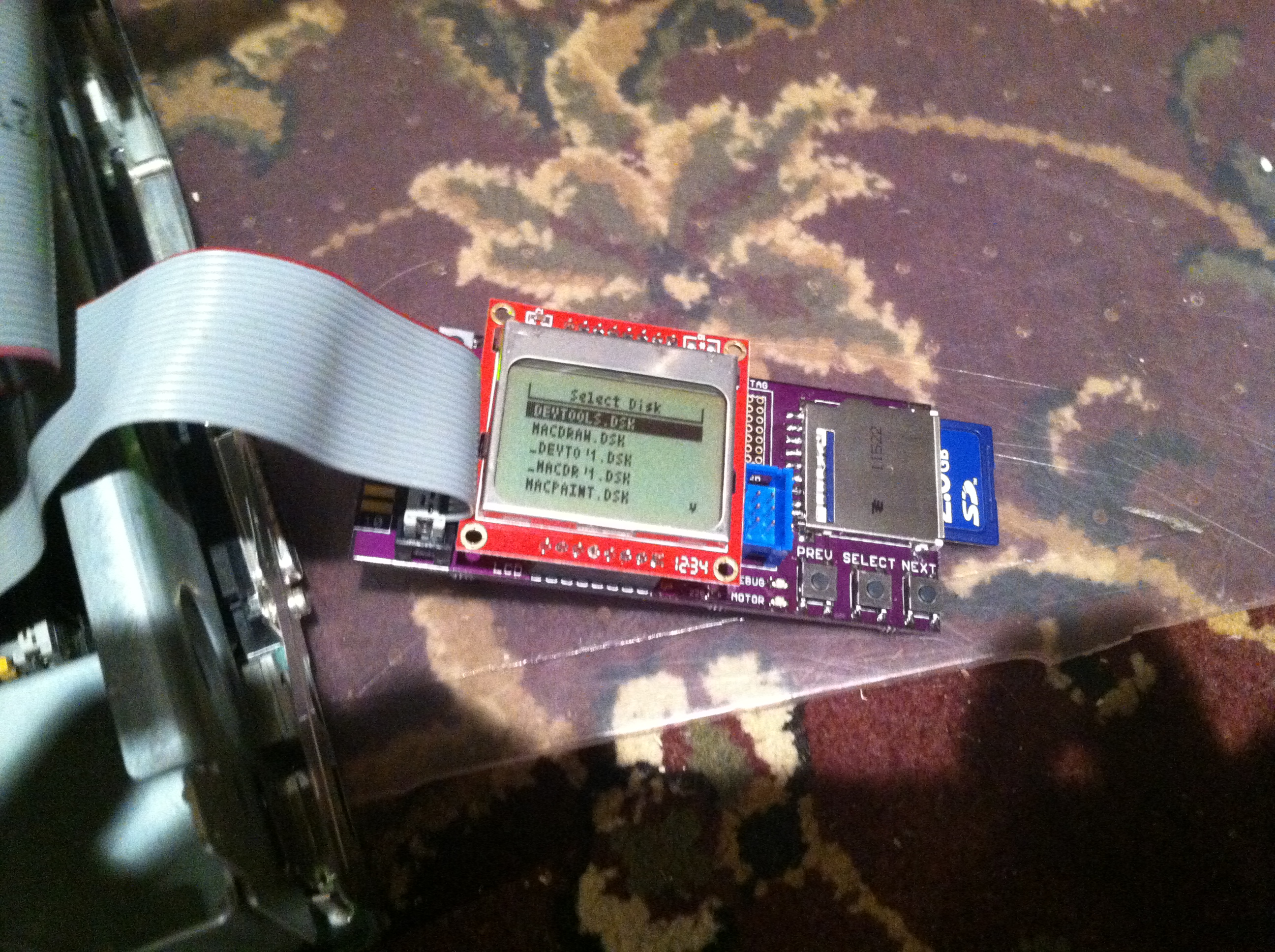
For a while, I thought I was out of luck. But then, I discovered the blog of a computer engineer who, among other things, managed to create a floppy disk emulator for 68k-based Macintoshes. I really liked the concept and the design was proven so I decided to build a few for myself!
bladeRF: a USB 3.0 Software Defined Radio
I just backed this project! Why? Because for $400, I get one of the most flexible and inexpensive SDR's on the market. Not only do I get that, I also get in-depth documentation and guides on how to use it. I've been wanting a nice SDR for some time now, ever since I saw the OpenBTS demo using the Ettus Research USRP1. Unfortunately, the USRP1 is, to me, too limited to justify the price. Additionally, there is a very steep learning curve if you're a beginner like me. I'm still interested in cell phone networks, though, and with the pending release of the bladeRF, I will finally have a chance to play around with the technology.
Notice a Speed Increase?
Well, I've finally done it—I've purchased a VPS and now I'm hosting this blog on it! I'm still using CloudFlare for caching, spam-filtering, and DDoS protection, but now I'm running the blog on a network that is about two orders of magnitude faster than my home upload speed of 180 KB/s. It is VERY nice and the transition went much smoother than I expected!
CloudFlare is Awesome!
I've been trying out CloudFlare to try to speed up the site a bit and so far, it's working great! It's also handy because I can use it to bypass 1and1's 5 subdomain limit because I'm using CloudFlare's servers.
Unfortunately, this means I've had to reconfigure a bunch of stuff. I've already noticed that some things are breaking (https stuff) and I'm trying my best to fix them, but sometimes it's difficult to pinpoint the source of the problem.